Mori, on your desktop.
The whole agent, on your Mac or Windows PC. She works your apps, your files and your real Chrome, builds with a live preview, and checks the result before she tells you it is done.
Everything on this page is in 1.38.0, on the Mac now. Windows gets it when its installer ships.
253
Built-in tools
Files, terminal, apps and windows, Chrome, git, documents and more.
186
Skills in the Hub
Ready procedures that install offline.
37
Slash commands
32 of them also work from Discord and Telegram.
16
Ready workflows
And four workflow scripts beside them.
23
Connectors
GitHub, Linear, Sentry, Notion, Stripe and more.
09
Providers on your own key
Plus the managed plan and local Ollama.
12
Messaging channels
Discord, Telegram, Slack, Signal, email and more.
08
Helpers at once
In Swarm, merged into one report.
She works your computer, the way you do.
She clicks, types and switches apps the way you would, and works inside the browser you are already signed into. To press a button she reads the window's own list of controls, then clicks the one she wants, with no screenshot needed.
Interactive elements of "TextEdit" (4):
- 1.[Button]Cancel
- 2.[Button]Save
- 3.[TextField]Save As
- 4.[PopUpButton]Where
click_element(2)
On the desktop
She drives the mouse, the keyboard, the windows and the apps, with the same tools on a Mac and on a Windows PC.
Buttons by name
She lists the buttons, fields and menus of the front window from the system's accessibility tree and clicks them by name, with any model and no screenshot needed.
Every mouse and keyboard move
Middle and triple clicks, drags built from a separate press and release, held keys and chords, and text fields set directly.
Apps and windows
She lists running apps, opens, focuses and closes them, and reads or changes a window's position, size and state.
System controls
Volume, mute, dark mode, sleeping the displays, locking the screen, and Wi-Fi on or off are one request away.
Screen awareness
Each message can tell her which app and window you are in, your front Chrome tab and which terminals are open. Titles and the tab's address only, never a picture of your screen, and one switch turns it off.
Home and desk
She controls Home Assistant devices, plays and skips music in Spotify or Apple Music, and adds Calendar events and Reminders on the Mac.
In your real Chrome
With the Mori Chrome extension, she works inside the Chrome you are already signed into.
Whole web tasks
A web task runs in your signed-in Chrome with real clicks, typing and form fills. On a checkout she fills the cart and stops before the final payment.
Reads the real page
The title, the headings, every interactive element including iframes, the links and the text of the page you actually have open.
Tabs
She lists, opens, switches and closes your tabs, and can move a background tab to a new page without bringing it forward.
Console errors
She reads console messages and JavaScript errors from a live page in your Chrome.
A separate browser for errands
A separate, signed-out browser searches Amazon, eBay, Walmart, Best Buy, Target, Etsy and Google, compares listings, and stops at the cart so you finish any purchase.
The requests behind a page
She can capture the JSON requests a page makes, to find where its data comes from or why it loads slowly.
Designs and builds, with a live preview.
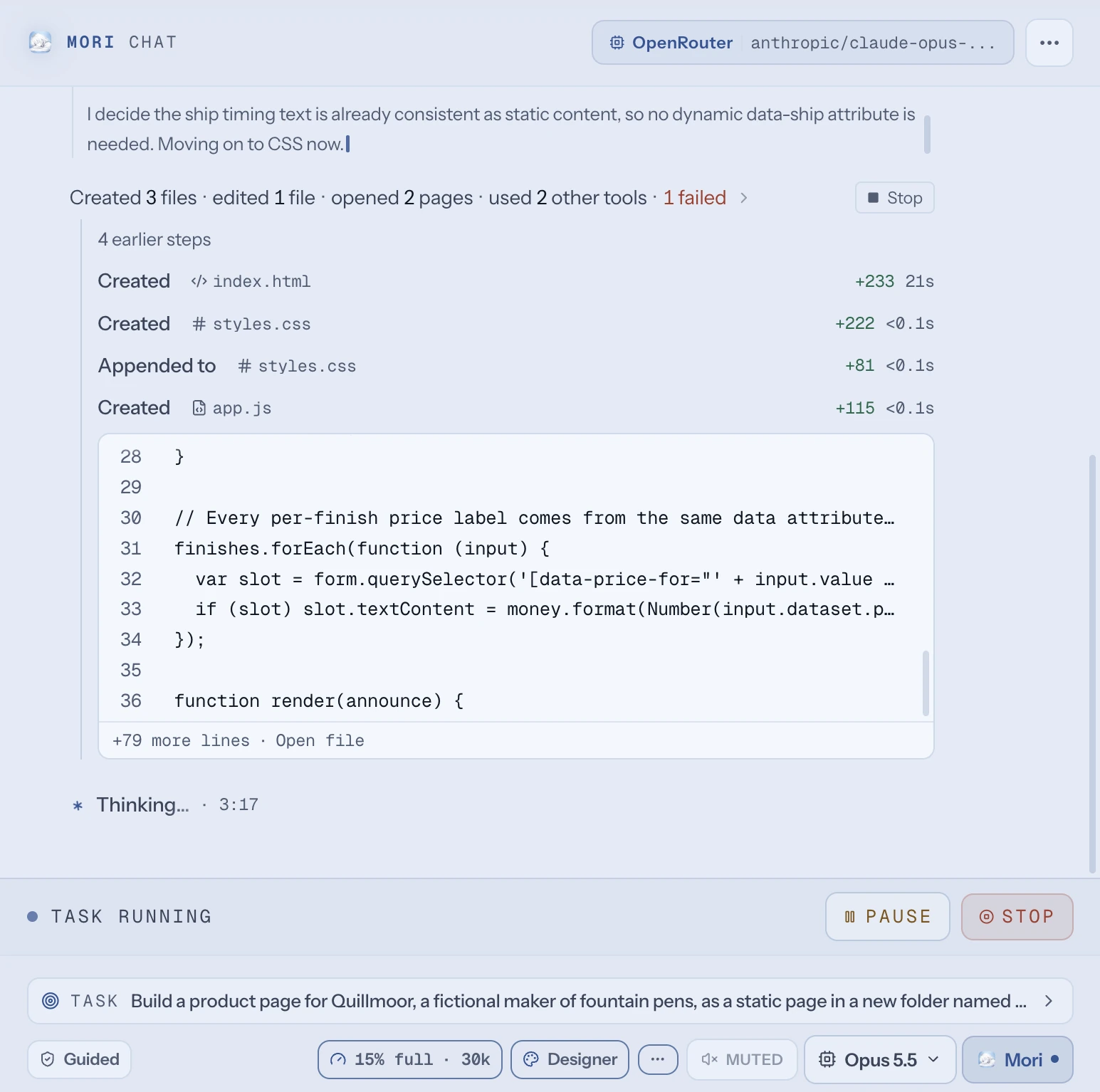
Ask for a site, an app or a screen. She plans it like a designer, builds it, and looks at the result before she hands it over.
Designer mode
Say /design and she reads your project's own tokens, theme and components first, looks for references on 21st.dev, GitHub and the open web, and writes a short plan before she builds.
Honest references
A reference source that could not be reached is named with its error, and no link appears that did not come back from a real fetch.
A designed starting point
New web apps start from a Vite, React and Tailwind v4 project with design tokens, shadcn-style components, Lucide icons and Inter.
Live preview
The Mori Preview window shows a project folder, an HTML file or a running dev server, and dev servers keep running in the background.
She looks at her own work
She checks a build with a picture of the preview window only, never your desktop, and the picture comes with the page's console errors.
Image Studio
A Studio tab makes pictures from a prompt, with the cost of each and a running total, and one click puts a picture into your thread or your project folder.
Her own branch, tests that can fail, a pull request.
She reads a repo, works on her own branch, proves the tests can fail, and opens the pull request. The merge is yours.
#14 Keep the time zone in exported dates
mori/export-time-zone → main
CI passing (3)
Merge #14 into main?
Keep the time zone in exported dates
mori/export-time-zone → main. CI is green. This merges on GitHub and cannot be undone from here.
Knows a repo in one step
One call reads a project's own instructions file, how it builds and tests, and its layout with file counts.
Workspaces
A big or risky job runs in its own git worktree and branch, so your main checkout is untouched until you merge it back.
Pull requests
She opens a pull request from a fresh mori/ branch, never commits on main, leaves merging to a button you confirm, and wakes the thread when CI fails so she can read the log and fix it.
Tests that can fail
She breaks the code one change at a time and reruns the tests, so a change no test notices shows up as behaviour nothing checks.
Terminals and other agents
Named shells persist across turns on your machine, in a throwaway Docker container or over SSH, and she can drive interactive programs like claude, codex, aider, Python or psql.
Plan first, review after
/captain writes a spec in a read-only pass for you to approve before the build, and /review reads the folder's working diff and reports findings by severity.
Research that reads its sources.
She reads the sources, not the snippets, and every answer ends with what it cited. A source it cites but never opened says so.
4 sources1 cited, not read
STRICT Tables
sqlite.org
Release History Of SQLite
sqlite.org
Datatypes In SQLite
sqlite.org
github.com/sqlite/sqlite
github.comcited, not read
Deep research
She splits a question into angles, sends researchers out in parallel to search and read, and returns one answer with its sources.
Unread sources are marked
A source that was cited but never read is marked, and a GitHub page read through GitHub's API counts as read.
Reads pages in full
Up to five pages at once, as clean text, and long pages are kept whole rather than cut.
GitHub as a real source
She searches repositories, searches real code once a GitHub token is set, reads files, reads issues including closed ones, and reads release notes.
Developer answers
Packages on npm, PyPI and crates.io, the top-voted Stack Overflow answer, and Hacker News discussions.
Guesses are called guesses
A date given beside a version that no page read in the run carries is flagged as unverified.
Helpers for big jobs, workflows for repeat ones.
Big jobs split across helpers that each start with a clean context. Five stages set how hard she thinks, from Spark to Swarm.
- SparkInstant, like texting
- FlowThe default, for everyday work
- TranceReads, thinks and cites, never writes
- ForgePlans, writes and proves all of it
- SwarmSplits the job across up to eight helpers
Helpers
An independent piece of a big job goes to a helper with its own fresh context and full tools, and comes back as a short result with file paths.
Swarm
In Swarm, up to eight helpers work at once and their results merge into one report.
Four built-in agents
Researcher reads and never writes, Coder builds and runs, Critic finds problems and never rewrites, and Designer shapes look and copy. You can write your own as markdown files.
Workflows, drawn live
Each step of a workflow is drawn in the chat as it runs, and /workflow runs any ask as one: fan out, gather sources, verify, then report.
Workflow scripts
Four script patterns ship ready: adversarial verify, judge panel, loop until dry, and sweep and critic. A script runs in a sandbox with no file access, network or clock, and asks before it starts.
Advisors
/moa has other models draft first, at one extra call each per turn.
Find and fix a bug
- Pin down what actually goes wrong
- Get the lay of the project
- Find the code responsible
- Work out the real cause
- Make the smallest fix that addresses the cause
- Prove it is fixed
Sixteen workflows, ready to run.
- Find and fix a bug
- Understand an unfamiliar codebase
- Debug something that is failing
- Write tests for existing code
- Review and ship what you changed
- Find and remove dead code
- Check this machine is set up properly
- Answer a question properly, with sources
- See how something compares to its competitors
- Build a presentation
- Write up what happened this week
- Draft a message to someone, for you to approve
- Research the question
- Build it, then prove it works
- Review it properly
- Study a repo, then build on it
Work that keeps going while you are away.
Automations, routines and goals keep working while you are away, inside the limits you set.
Automations
An automation is a saved prompt with one to twenty triggers: a schedule, on demand, a webhook, GitHub activity or a chat channel.
Six routines
The routines here are ready to schedule with /blueprint, each at a time you can change.
Exact timing
Jobs run on a five-field cron expression, once at a set moment, or every few minutes.
Writes only where you said
When you schedule a job you can name the folders it may write in, and anything outside them still waits for you.
/goal
Keeps a thread working until an independent check agrees the goal is met, and stops after six continuations, two dollars or thirty minutes.
Quiet unless something changed
Scheduled jobs remember what they found last time, stay quiet when nothing changed, and retry when the model was unreachable.
- Morning brief07:30 weekdaysA short read on your day before you start it.
- Watch for important mailEvery 4 hoursTells you when something actually needs you.
- Weekly reviewFridays 17:00What moved this week, and what quietly did not.
- Watch for renewalsMondays 09:00A warning before a subscription charges.
- Tidy the Downloads folderSaturdays 10:00Sorts the pile into folders, and deletes nothing.
- Evening wind down18:30 weekdaysCloses the day out so tomorrow starts from somewhere.
She remembers, and brings the right know-how.
Facts, people and past work stay on your machine, and each ask brings in the skills written for it.
answers-first.md
Wants the answer first, and detail only when asked
site-deploys.md
The shop site deploys from main, and never on a Friday
brand-colours.md
Deep green and warm white, with no gradients
Memory you can read
Each fact is its own small file with a one-line recall key, and a near duplicate becomes an update instead of a second copy.
A brain with dates
A knowledge graph links people, projects and things. She can walk its links, show an entity's dated timeline, or say when it was last seen as of any date.
Stays on your machine
The brain ships inside the app and runs on your computer, with embeddings from local Ollama or a bundled local server unless you choose otherwise.
Every past conversation
She searches the full text of every past conversation, so a passing mention from weeks ago is findable.
Skills come in on their own
She reads what you asked for and brings in up to eight skills for it, from the eleven built-in ones or your own.
Skills Hub
186 ready procedures ship with the app and install offline, and /learn turns a folder, a page, a topic or the last task into a new skill.
Eleven skills, built in.
- Web project build
- Design system discipline
- Design critique pass
- Anti-slop rules
- Debugging protocol
- Deep research method
- Polished deliverable
- Market and competitor scan
- Business outreach
- Ad campaign craft
- Social content engine
Projects, threads, and a look that is yours.
Work stays organised by project, and every thread shows what it is waiting on. The home screen shows what is running, what needs you, and your latest threads.
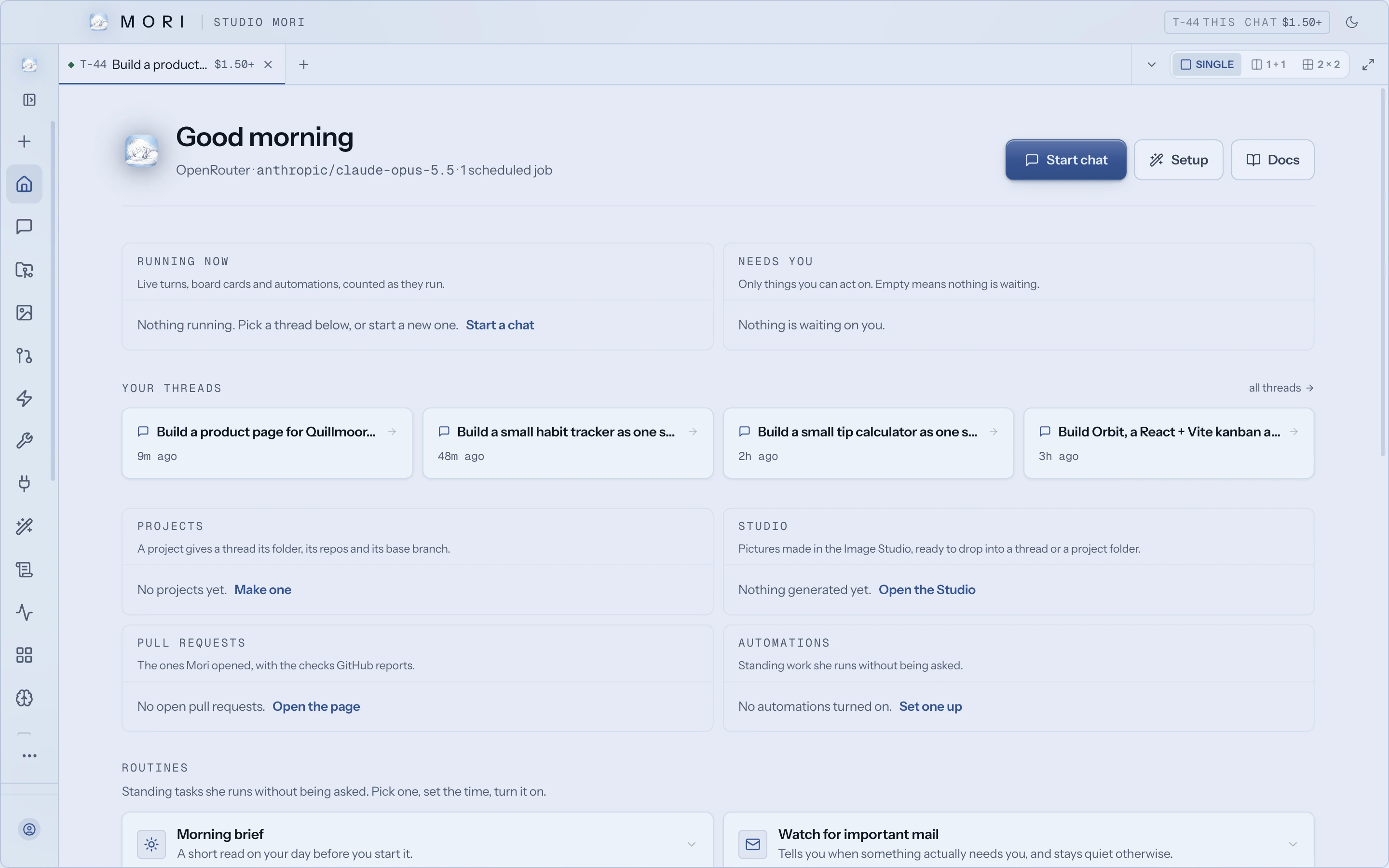
/for commands
- /designDesigner mode: real references and a plan first
- /captainA read-only pass writes a spec you approve
- /reviewReview the working diff, findings by severity
- /goalKeep working until this holds
- /projectDedicate this thread to a project
- /learnTurn a folder, page or topic into a skill
- /blueprintSet up a routine that runs on its own
- /sessionsSearch the full text of every past chat
Projects
A project has a name, a goal every chat in it inherits, and a folder where its work lands.
Dedicated and starred threads
/project dedicates a thread so she knows its folder, repos and goal without being told again, and /star keeps a thread forever.
Threads that show their state
Each thread shows whether it needs you, is working, is waiting, is ready for review or is idle, with a short code, up to twenty tags and its running cost.
More than one Mori
Run up to nine copies, each with its own settings, memory, sign-in, ports and projects.
Your look
Four layouts (simple, default, pro and focus) and eight themes, from Porcelain to ASCII, change the whole app.
Branch and export
/branch forks a conversation, and /export saves it as Markdown or HTML with secrets scrubbed.
Reads almost any file. Makes real ones.
Hand her a file and she reads it. Ask for one and she writes a real file you can send. She can speak her replies, too.
Her voice, tried in order
- 1ElevenLabsOn your ElevenLabs key
- 2OpenAIOn your OpenAI key
- 3Local neural voiceWhen you have installed one
- 4Built-in system voiceAlways there, and always last
Documents, sheets and decks
Word or PDF documents, Excel or CSV spreadsheets, and PowerPoint decks, written as real files.
Reads almost any file
Code, images, PDFs, Word, PowerPoint, Excel, CSVs and zips are detected and read.
Data and scans
Real SQL over a CSV, and the text in screenshots and scans, read with your system's own OCR.
Audio and video
She transcribes voice notes and recordings up to 25 MB, and watches a video by sampling frames across the whole clip.
Voice
Talk with an open mic or push to talk. Replies are spoken through ElevenLabs, OpenAI or a local voice, with your computer's own voice as the fallback.
Images, video and music
Images from Gemini 2.5 Flash Image by default on an OpenRouter key, and video and music when a provider key is set. Without one, she says so plainly.
Reach her from anywhere.
Your phone, your chat apps and your other tools can all hand her work on this computer. About Mori Link
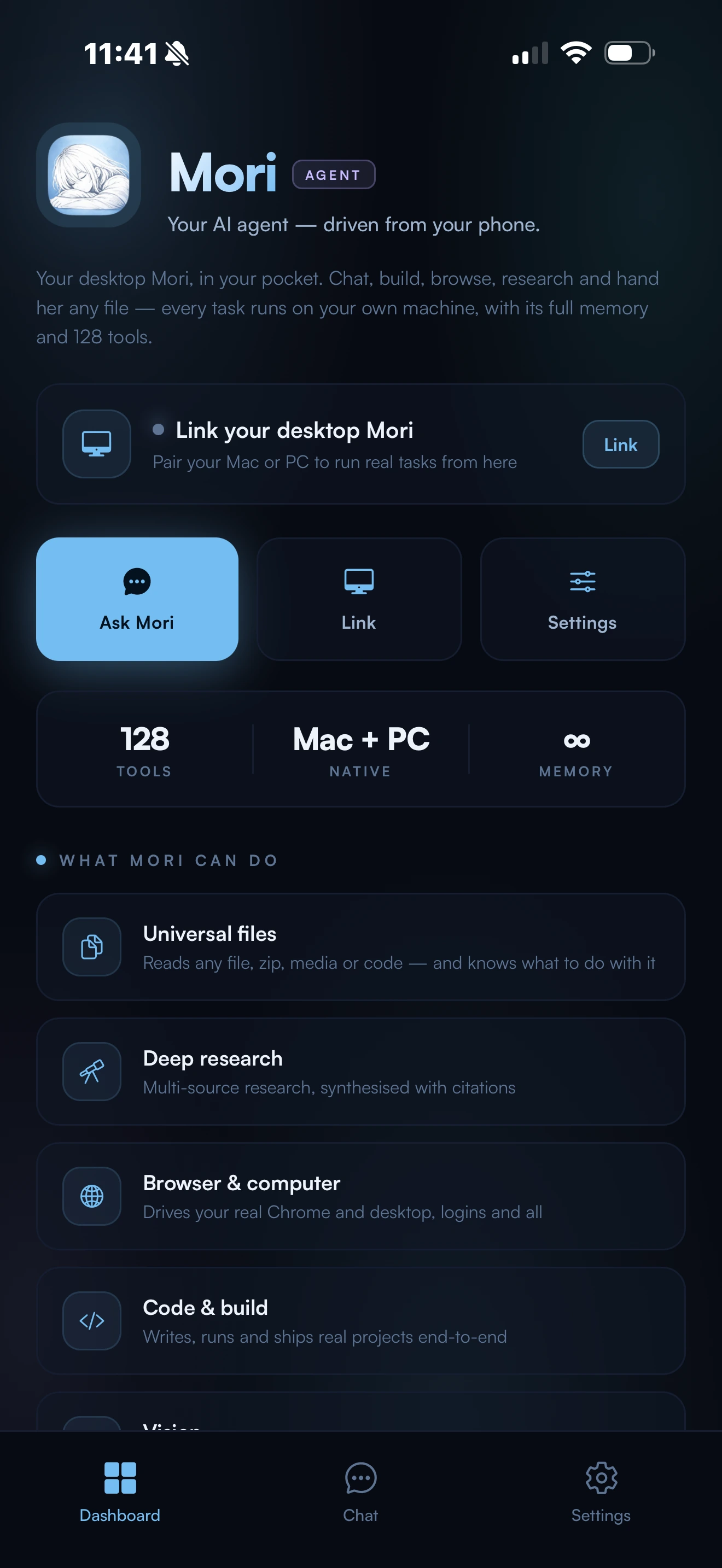
Mori Link
Pair your iPhone with a six-digit code while both are signed into the same account, and this computer runs commands only from that phone.
From your phone
Once paired, the phone runs terminal commands, builds files, drives the browser, sends email and messages, and runs multi-step tasks with full memory and tools.
Discord and Telegram
Up to eight Discord and Telegram bots, each with its own owner, and their menus carry 32 of the slash commands.
More channels
Slack, Matrix, Signal, Zulip, Mattermost, IRC, ntfy, email, and iMessage on the Mac, plus any outbound webhook.
Email
She sends email with attachments through the Gmail you are signed into in Chrome, with an SMTP account as the fallback, and sends in bulk up to 25 at a time.
For your other tools
A local OpenAI-compatible API, an MCP server for Claude Code and editors, and an ACP mode for editors like Zed, each off until you switch it on.
Pick the model. Set the leash.
Choose how much she may do alone, and for how long. Guided is where she starts.
- GuidedShows file changes as a diff first, and confirms the risky commands it recognises.
- TrustedRuns routine work, and confirms the risky actions it recognises.
- CommanderFull autonomy, for a time-boxed window.
Nine providers on your own key
OpenRouter, Anthropic, OpenAI, Groq, DeepSeek, xAI, Together AI, Mistral or Perplexity on your own key, the managed plan included when you sign in, or local models through Ollama with no key.
The newest Claude
Opus 5.5 leads the Opus models on OpenRouter and on your own Anthropic key, and Fable 5.1 is the default on a direct Anthropic key.
Cards with the real choices
Approval cards show the whole command and name the chat that asked, and Stop, Escape or a closed window is never taken as a yes.
Protected files
Changes to instruction files, git hooks, git settings, editor settings and CI workflows always show you the change first, at every autonomy level.
Switches and undo
Seven permission switches cover apps, browser, screen awareness, file writing, terminal, keyboard and destructive actions, and every file is checkpointed before she changes it, so the last few minutes can be undone.
Where the money goes
A spend policy splits the work into building, research, chat, housekeeping, helpers and double-checking, with Saver, Balanced and Full presets.